
A homeowner is standing in an inch of water in the basement. She finds your name on Google and taps your website.
White screen. Then a spinning wheel. Then a giant photo of a smiling technician, still loading from the top down. Her thumb hits the back button. The next plumber’s site opens right away, and she calls him.
You never knew she was there. That is the problem with a slow website: it loses jobs without leaving a trace. No missed call, no voicemail, nothing.
Short answer
Page speed is how fast a page shows up and responds on a real phone. Google’s targets, called Core Web Vitals, are: the main content visible within 2.5 seconds, taps answered within 200 milliseconds, and a page that doesn’t jump around (a layout shift score of 0.1 or less), for at least 3 out of 4 visits. Main content that takes more than 4 seconds is what Google calls poor. Most slow trade websites are slow for the same few reasons: huge photos, sliders, chat and other add-on widgets, and cheap hosting.
What “page speed” actually means
Page speed is not one number. It is really three questions your customer asks without thinking about it:
- Is anything happening? Does the main thing on the page show up, or am I staring at a blank screen?
- Can I use it? When I tap “Call now,” does anything happen?
- Is it holding still? Or does the button jump away right as my thumb lands on it?
Google measures each one with its own number. Together they are called Core Web Vitals. Google’s web.dev team publishes the targets, and they are the closest thing the web has to an official answer to “how fast is fast enough.”
How slow is too slow? Google’s three numbers
Here are the targets from web.dev, Google’s site for web developers. “Good” is where you want to be. “Poor” is where customers start giving up on you.
- Main content shows up (LCP): good is 2.5 seconds or less. 2.5 to 4 seconds needs improvement. Over 4 seconds is poor.
- Page reacts to a tap (INP): good is 200 milliseconds or less. 200 to 500 milliseconds needs improvement. Over 500 is poor.
- Page holds still (CLS): good is 0.1 or less. 0.1 to 0.25 needs improvement. Over 0.25 is poor.
LCP: how long until the main thing shows up
LCP stands for Largest Contentful Paint. In plain words: how long until the biggest picture or block of text on the screen is drawn. On most contractor sites, that is the big photo at the top. So if that photo is slow, your whole page feels slow.
INP: how fast the page reacts when someone taps
INP stands for Interaction to Next Paint. It measures the delay between a tap and the page doing something about it. Two hundred milliseconds is a fifth of a second. Past that, people tap again, or decide your site is broken. INP replaced an older measure (First Input Delay) as an official Core Web Vital on 12 March 2024, so older articles may not mention it.
CLS: whether the page jumps around
CLS stands for Cumulative Layout Shift. You know this one even if you never heard the name. You go to tap “Call,” a banner loads above it, everything slides down, and you tap “Financing” instead. web.dev says the usual causes are images with no size set, plus ads and widgets that resize after they load.
What “3 out of 4 visits” means
Google doesn’t judge your site on your own visit from the office Wi-Fi. web.dev says to measure the 75th percentile of real page loads, split by mobile and desktop. In plain words: at least 3 out of 4 visits should hit the target. The slowest quarter, usually older phones on weak signal, is exactly who you need to plan for.
What about “53% of people leave after 3 seconds”?
You have probably seen this number on a dozen marketing sites. We traced it back to where it came from.
of mobile visits were likely to be abandoned if a page took longer than 3 seconds to load. Source: Google’s DoubleClick publisher blog, 8 September 2016, based on Google Analytics data from about 3,700 mobile sites in March 2016.
So it is real, and it is from Google. But it is also ten years old. Phones, networks and websites have all changed since. And the sample was websites in general, not plumbers or roofers.
Our honest read: treat it as a direction, not a law. People leave slow pages. Nobody can tell you the exact percentage for your site in 2026. You will also see other famous bounce-rate numbers online. We couldn’t open the original study behind them, so they are not in this post.
Does page speed affect your Google ranking?
Yes, a little, and Google says so in plain words. Its page experience guide says Core Web Vitals “are used by our ranking systems.”
The same guide is clear that the most relevant page still wins, even when its page experience is poor. And it says good scores alone won’t put you at the top.
So here is the way to think about it. A fast site won’t beat a competitor who answers the customer’s question better. But a slow site gives customers a reason to leave before they read your answer at all. Speed is one piece of the bigger picture we lay out in what actually moves local SEO for contractors.
Why most trade websites are slow
The same four culprits come up again and again on trade websites. None of them are about fancy code. They are about stuff piled on top.
1. Huge photos
This is the big one. The 2025 Web Almanac, a yearly study of the web by the HTTP Archive, found the median mobile home page loaded 911 KB of images (July 2025 data). That is for the whole page.
Now check a photo you took on your phone last week. Open its details and look at the file size. If it says anything over 1 MB, that one photo outweighs all the images on a typical home page. Upload a few of those as-is, and your homepage is hauling more weight than a truck full of tile.
The fix is boring and it works. Resize photos to the size they actually show on screen. Save them in a modern format like WebP or AVIF, which web.dev recommends. And never set the top photo to load “lazily” (after everything else). web.dev says lazy-loading the main image always adds delay.
2. Sliders and carousels
The rotating banner at the top of the homepage, with five photos and five slogans, looks busy and important. It is also slow.
web.dev warns that carousel images that aren’t even on screen yet can compete with the main image for the phone’s bandwidth. On top of that, the slider itself needs extra code to run. One strong, real photo of your crew on a job usually does more than five rotating stock photos.
3. Chat widgets, pop-ups and other add-ons
Every chat bubble, review badge, booking widget, tracking pixel and pop-up is a little program from another company. The customer’s phone has to download it and run it.
web.dev calls third-party scripts “a common cause of performance slowdowns.” Its advice: load them after the important parts of the page, and remove the ones that add little value. Ask yourself honestly when someone last used your chat widget. If the answer is “I don’t know,” that is your answer.
4. Cheap or overloaded hosting
Before a phone can show anything, your web server has to answer. That first wait is called Time to First Byte. web.dev says a slow one can make a 2.5-second LCP “challenging, or even impossible.”
Bargain hosting plans often pack many sites onto one busy server. You can shrink every photo and still lose seconds there. A decent host with caching turned on is usually a small cost next to one lost job.
If you would rather not dig through all this yourself, our free audit includes a phone speed test of your homepage, with the slowest parts named in plain words.
How to check your own site in two minutes
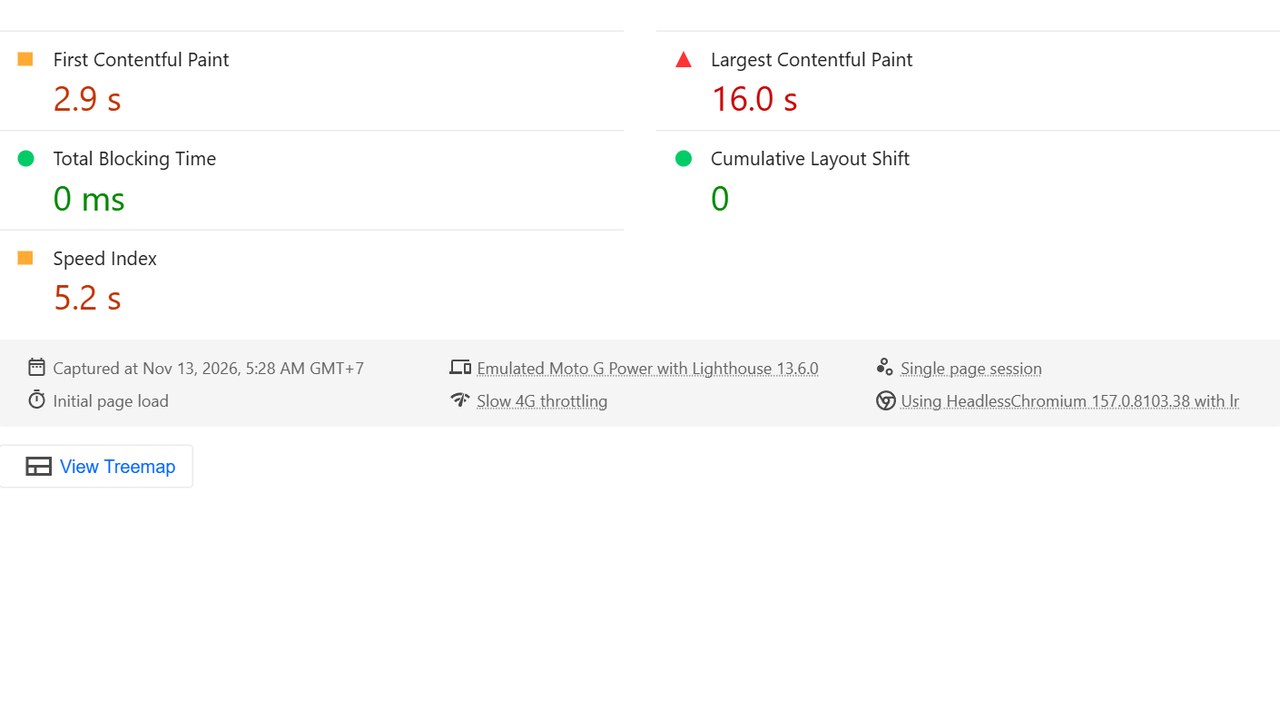
You don’t need to guess. Google’s free tool, PageSpeed Insights at pagespeed.web.dev, tests any page and shows you both real-visitor data and a one-off lab test.
We wrote a full walk-through, with what each section means and what to do when it says there is no real-user data: how to test your website speed for free with PageSpeed Insights.
One tip up front: always look at the Mobile tab first. Most of your customers find you on a phone, often with one bar of signal.
Speed is only half the job
A fast page that says nothing useful still loses the job. Once the page loads, the customer needs to see, right away, what you do, where you do it and how to call you. We cover that in what a contractor website needs on the first screen.
And if you have a stack of near-identical “Plumber in [Town]” pages, those can hurt you in a different way. Here is how to build city pages that rank without getting flagged as spam.
Do this this week
- Test your homepage on pagespeed.web.dev, Mobile tab. Write down the LCP number.
- Open your homepage on your own phone, on mobile data, not Wi-Fi. Count the seconds until the call button shows up.
- If the top of your homepage is a slider, ask your web person to replace it with one real photo.
- List every chat box, pop-up and badge on the site. Remove the ones nobody uses.
- Ask your web person two questions: “Are our photos resized and in WebP?” and “Is caching on?”
Common questions
What is a good page speed score?
In PageSpeed Insights, Google calls 90 to 100 good, 50 to 89 “needs improvement” and under 50 poor. But that score comes from a lab test and moves between runs. The Core Web Vitals numbers from real visitors matter more than the score.
Is a 3-second load time too slow?
For the main content, yes, by Google’s standard. Its “good” line for LCP is 2.5 seconds or less. Between 2.5 and 4 seconds “needs improvement,” and over 4 seconds is poor.
Does a slow website hurt my Google ranking?
Google says Core Web Vitals are used by its ranking systems, but the most relevant page still wins. Think of speed as something that can hold you back, not something that pushes you to the top by itself.
Why is my site fast for me but slow for customers?
You probably test it on office Wi-Fi, on a newer phone, and your phone may have saved parts of the site from your last visit. A customer on an older phone with weak signal is starting from zero. Google’s targets are built around those slower visits.
Will a new website fix my speed?
Not by itself. A new site with giant photos, a slider and four widgets will be just as slow. What fixes speed is less weight on the page and a decent host, whether the site is new or old.
Where to start
Run the PageSpeed test today. It takes two minutes and costs nothing. If the main content takes more than 2.5 seconds on mobile, you now know it, and you know the four usual suspects.
If you want a second pair of eyes, our free audit checks your site on a phone: speed, call button, quote form and license number, with screenshots. If you want help fixing what it finds, the options are on our packages page.
Sources
- web.dev (Google), “Web Vitals,” last updated 31 October 2024. web.dev/articles/vitals
- web.dev (Google), “Largest Contentful Paint (LCP),” last updated 4 September 2025. web.dev/articles/lcp
- web.dev (Google), “Interaction to Next Paint (INP),” last updated 2 September 2025. web.dev/articles/inp
- web.dev (Google), “Cumulative Layout Shift (CLS),” read 12 November 2026. web.dev/articles/cls
- web.dev (Google), “Optimize Largest Contentful Paint,” last updated 31 March 2025. web.dev/articles/optimize-lcp
- web.dev (Google), article on loading third-party JavaScript, read 12 November 2026. web.dev/articles/optimizing-content-efficiency-loading-third-party-javascript
- Google Search Central Blog, post introducing INP as a Core Web Vital, 10 May 2023 (gives the 12 March 2024 switch date). developers.google.com/search/blog/2023/05/introducing-inp
- Google Search Central, “Understanding page experience in Google Search results,” read 12 November 2026. developers.google.com/search/docs/appearance/page-experience
- DoubleClick Publisher Blog (Google), “The need for mobile speed,” Alex Shellhammer and Juliette Neel, 8 September 2016. doubleclick-publishers.googleblog.com/2016/09
- HTTP Archive, Web Almanac 2025, chapter 14 “Page Weight,” published 15 January 2026. almanac.httparchive.org/en/2025/page-weight
- Google, PageSpeed Insights documentation, “About PageSpeed Insights,” read 12 November 2026. developers.google.com/speed/docs/insights/v5/about