
The email lands on a Tuesday: “We’ll build you 150 city pages, one for every town in the county. Rank everywhere!”
A month later your site has 150 new pages. Each one starts with “Looking for the best plumber in [Town]? Look no further!” Same photos. Same paragraphs. Only the town name changes. It reads like a ransom note made from one newspaper.
Those pages feel like hard work. To Google, they can look like doorway pages, and that is a named spam policy. Here is what Google actually says, and how to build city pages that earn their place.
Short answer
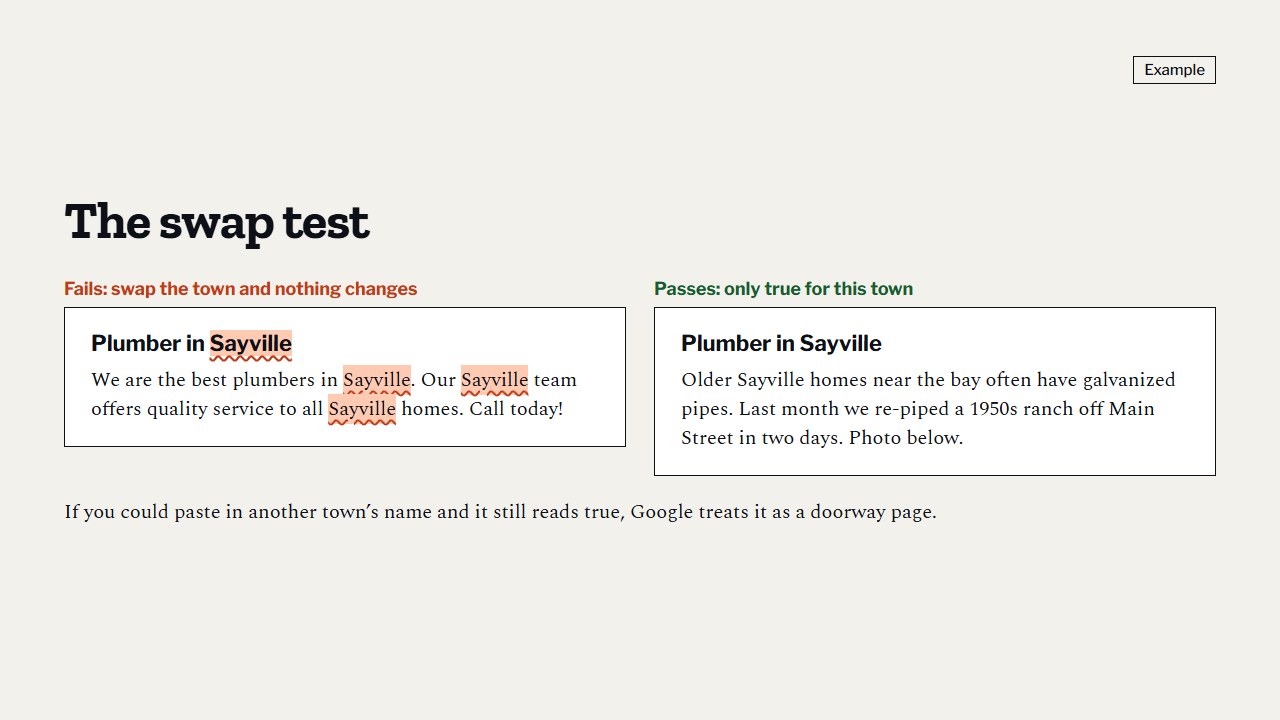
Google’s spam policies list pages aimed at specific cities or regions that funnel visitors to one place as an example of “doorway abuse.” Our rule of thumb is the swap test: if you can swap the city name for another town and the page still reads true, it is a doorway page. A city page earns its place with things only true there: jobs you did in that town, local photos, the problems common in its homes, local permit notes and reviews from customers there. A few real city pages beat dozens of copies.
What Google’s spam rules actually say
Google publishes its spam policies on its Search Central site. One of them is doorway abuse: sites or pages created to rank for specific, similar searches, which lead people to in-between pages that are less useful than the real destination.
Google’s list of examples includes “pages targeted at specific regions or cities that funnel users to one page.” It also lists creating substantially similar pages that are closer to search results than a real, browsable site.
A stack of copy-paste city pages that all push visitors toward the same “call us” page sits uncomfortably close to that description.
There is a second policy to know about. In March 2024 Google added a scaled content abuse policy: many pages made mainly to manipulate rankings rather than to help people. Google said the policy applies whether the pages are made by automation, by people, or a mix. So “a person wrote them” or “AI wrote them” doesn’t change anything. What matters is whether the page helps the reader.
Note what Google does not say. It doesn’t say city pages are banned. It doesn’t give a word count or a page limit. The problem is pages that exist only to catch a search and add nothing new.
The swap test
This is our own rule of thumb, not Google’s wording. But it catches the copy-paste city page every time, and anyone can do it in two minutes.
- Open one of your city pages.
- In your head, replace the city name with a town on the other side of the state.
- Read the page again.
If the page still makes sense, it is a doorway page. Nothing on it is actually about that city.
Here is a page that fails:
- “Looking for a reliable plumber in Irvine? Our licensed team serves Irvine homeowners with fast, friendly service. Call the Irvine plumbing experts today!”
Swap “Irvine” for “Fresno” and it is still true. Or rather, it is still equally empty.
Here is one that passes. The town and the details are made up for this post, to show the kind of thing a real plumber would write:
- “Most of the slab leaks we fix in Oak Hollow are in the houses built in the 1970s, where the copper lines run under the foundation. Last spring we rerouted one through the attic in a house near the high school, so the family didn’t have to tear up their floors. Oak Hollow needs a permit for a water heater swap. We pull it for you.”
Swap the town name and it falls apart. That is the point. Write what is true in your towns.
What real local content looks like
A city page doesn’t need to be long. It needs to contain things a stranger couldn’t have written from a desk. Pick from this list:
- Jobs you did there. What broke, what you did, how it turned out. No street addresses, and ask the customer first.
- Photos from those jobs. Real ones, resized so they don’t slow the page down.
- The homes in that town. Older houses with old wiring, a newer development with a known issue, hard water if the area has it. Only what you have actually seen.
- Local rules. If the city needs a permit for the work, say so, and say whether you pull it.
- Reviews from customers in that town, with their permission, or a link to them.
- Local questions. What do people in that town ask you on the phone? Answer them on the page.
- How fast you can usually get there, if you can say it honestly.
Two things to avoid: claiming an office in a town where you don’t have one, and making up jobs. Both are easy to check, and both cost you trust when someone does.
Every city page should also have the same basics as your homepage: a call button, a short quote form and your license number near the top. Here is what a contractor website needs on the first screen.
Not sure whether your current city pages pass? Our free audit looks at your website on a phone (call button, speed, quote form, license number) and gives you the top three fixes in plain words.
How many city pages should you have?
Fewer than you think. Start with the two to five towns that already bring you the most work, the ones where you have real jobs, photos and reviews to talk about.
For every other town, one honest service area page is enough: a list of the towns you cover, maybe a simple map, and how you handle calls from farther out. That page is useful and true, and nobody needs a hundred of them.
Then add a new city page only when you have something real to put on it. A finished job in a new town with good photos is a reason. A wish to rank there isn’t.
One more thing: your website city pages and your Google Business Profile service area are two different things. Both matter, for different reasons. We cover the profile side in service area vs address: what sets your pin on the map.
What to do with the city pages you already have
If you already paid for a stack of copy-paste pages, don’t panic and don’t delete them all tonight. Go through them one by one:
- Run the swap test on each page.
- Keep and rewrite the pages for towns where you really do a lot of work. Add jobs, photos, local notes.
- Merge the rest into one service area page that lists those towns.
- Redirect the old addresses to the page that replaced them, so old links and bookmarks still land somewhere useful. Your web person will know this as a 301 redirect.
- Check they still load fast. City pages are often built from a heavy template. Test one with PageSpeed Insights and see where it lands against Google’s targets in what is page speed, and how slow is too slow.
Do this this week
- Open three of your city pages and run the swap test on each.
- Write down the two to five towns where you do the most work.
- For each of those, list one real job, one photo and one local fact you could add.
- Make sure you have one service area page listing every town you cover.
- If someone offers you “a page for every town,” ask them what will be different on each page. If the answer is “the town name,” say no.
Common questions
Are city pages bad for SEO?
No. Copy-paste city pages are the problem. Google’s spam policies list pages aimed at specific cities that funnel visitors to one place as doorway abuse. A page with real local jobs, photos and answers is a normal, useful page.
Can I use AI to write my city pages?
You can use it to help, but Google’s scaled content abuse policy applies no matter how pages are made, by people, automation or both. If the AI is just swapping town names into the same text, the pages fail the swap test either way.
How long should a city page be?
Google gives no word count. Write until you have said everything real and useful about your work in that town, then stop. A short page full of real facts beats a long page of filler.
Do I need a city page to show up in Google Maps there?
Maps listings are tied to your Google Business Profile, which is a separate thing from your website. A city page is mainly about your website showing up for searches in that town.
Should I delete my old copy-paste city pages?
Rewrite the ones for towns where you really work, merge the rest into one service area page, and redirect the old addresses. Don’t just delete them and leave dead links.
Where to start
Run the swap test on your three most important city pages today. If they fail, you know which ones to fix first, and the list above tells you what to put on them.
If you want help, our free audit looks at your site and Google profile together and tells you, in plain words, what to fix first. If you want help with the fixes, see our packages page.
Sources
- Google Search Central, “Spam policies for Google web search,” doorway abuse and scaled content abuse sections, read 12 November 2026. developers.google.com/search/docs/essentials/spam-policies
- Google Search Central Blog, post on the March 2024 core update and new spam policies, 5 March 2024. developers.google.com/search/blog/2024/03/core-update-spam-policies