
You run the business from your garage. The van’s in the driveway, the parts are on shelves next to the lawnmower, and the last thing you want is a stranger knocking on your front door at 10pm because Google told them to.
So you hide the address. Then you hear that hiding it hurts your ranking. Then someone tells you to list every city in the county. Then a guy on a forum says to rent a mailbox downtown.
Let’s sort out what is true, what is allowed, and what really sets your spot on the map.
Short answer
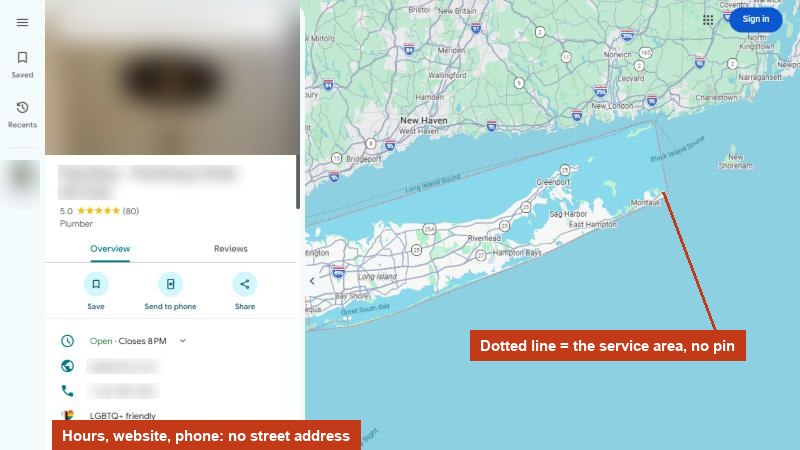
If customers don’t come to your address, Google’s rules say to remove it from your profile and set a service area instead: up to 20 cities or ZIP codes, within about 2 hours’ drive of your base. Your service area shows customers where you work, but it does not move where you rank. Rankings follow the address you verified with, even when it’s hidden. Never use a mailbox or virtual office to fake a local address.
Three kinds of business, by Google’s rules
Google sorts businesses into three types, and your type decides what you should do with your address:
- Storefront. Customers come to you. Show your address.
- Service-area business. You go to the customer. Google’s help page says that if you don’t serve customers at your business address, you should remove it from your profile.
- Hybrid. Customers can visit you, and you also go to them. You can show your address and set a service area.
The hybrid option has a catch. Google’s guidelines say that if you show an address and set a service area, that location should be staffed by your team and able to receive customers during your stated hours. A shop with your sign on it and someone at the counter counts. Your kitchen table does not.
What the service area actually does
Google’s help page says your service area shows customers where you can provide your services. You can set up to 20 areas, using cities, ZIP codes or other areas, and the whole thing shouldn’t stretch past about 2 hours of driving from where you’re based.
What it doesn’t do is decide where you rank. Sterling Sky, a local SEO firm that has tracked this for years, found that rankings are based on the address the business verified with. Their summary: the only impact the service area has is visual. They have rechecked it as recently as 2024 and still found no ranking effect.
So listing 20 cities won’t make you show up in all 20. It tells customers who find you that you work there.
So what sets your pin?
Your verified address. Sterling Sky’s tracking shows rankings follow the address you verified with, even when it’s hidden from the public.
“Proximity of address to the point of search” was rated the second most important map ranking factor by 47 experts in Whitespark’s Local Search Ranking Factors survey (2026 edition, November 2025). Only the primary category scored higher.
That’s why a roofer based 25 minutes outside a city often has a hard time ranking in the middle of it, no matter what the service area says. Distance is one of the three things Google itself names in its local ranking help page, along with relevance and prominence.
You can’t change where you are. You can be more relevant and better reviewed than the businesses that are closer. That’s the work in our guide to ranking higher in Google Maps.
Does hiding your address hurt your ranking?
Honest answer: it might, a bit, and the experts don’t fully agree.
- In Whitespark’s 2026 survey, experts rated “address is showing on the profile” as the seventh most important map factor.
- Sterling Sky reported a home-services listing that dropped sharply in rankings and calls after its address was hidden, then recovered when the address came back a month later.
- But the person who runs the Whitespark survey wrote that he is still not convinced showing vs hiding is a ranking factor, and suspects a Google bug in the cases he saw.
Here is the part that matters more: breaking the rules costs far more than any small ranking gain. Whitespark’s experts rated a P.O. box, mail store, virtual office or other false address as the single biggest suspension risk on their list. Sterling Sky, too, says it doesn’t condone going against Google’s guidelines, and warns that adding an address back can trigger a new verification.
And if you show a home address, you are telling the whole internet where you live. For most owners that’s a bad trade.
So: if customers really visit you at a staffed office with your sign on it, show it. If they don’t, hide it, and win on everything else.
How to cover a wider area honestly
If you want work in a city farther away, here’s what actually helps:
- A real page on your website for that city, with jobs you’ve done there, photos and local questions. Not a copy of another city page with the name swapped. Here is how to build city pages without getting flagged as spam.
- The right categories and services, so you’re the best match when you are within reach. See picking your Google Business Profile categories.
- A real second location, only if you truly open one. Google’s guidelines allow a separate profile for a location with its own staff, but only for a real place customers can reach.
Not sure how your profile is set up right now? Our free audit checks your Google profile, including your categories and how you compare with the top three businesses on the map near you.
How to set your service area
- Open your Business Profile and choose Edit profile.
- Go to Location.
- Next to Service area, choose edit, then type and pick each city or ZIP code.
- If customers don’t visit you, remove the business address in the same section.
- Choose Save. Google says approved changes can take up to 48 hours to show.
Common mistakes
- Listing the whole state. Google’s limit is about 2 hours of driving. Whitespark’s experts list service areas bigger than that as a suspension risk.
- Listing cities you never go to. If you won’t drive there for a small repair, don’t list it. The customer who calls will be annoyed, and so will you.
- A mailbox or shared office address. Google says a mailbox or virtual office isn’t eligible, and a co-working space only counts with your signage, your staff and real customer hours.
- Flipping between showing and hiding. Address changes can trigger a new verification. Decide once.
Do this this week
- Decide honestly: do customers come to your address, during set hours, with staff there?
- If not, remove the address from your profile.
- Set your service area to the cities you really work in, up to 20.
- Check that no city is more than about 2 hours’ drive from your base.
- Pick one far-away city you want more work in, and plan a real page for it on your website.
Questions owners ask
Can I use my home address for my Google profile?
Yes, many service businesses verify at home. If customers don’t visit you there, Google’s rules say to remove the address from public view. Sterling Sky’s tracking shows Google still ranks you from it behind the scenes.
Will adding more cities to my service area help me rank there?
Sterling Sky’s tracking says no. Rankings follow your verified address, and the service area only changes what customers see. Add the cities you serve so customers know, not to chase rankings.
Can I rent a virtual office in a bigger city?
No. Google’s guidelines say a virtual office or remote mailbox isn’t eligible for a Business Profile, and experts rate a false address as the top suspension risk.
How many service areas can I add?
Google allows up to 20, and says the whole area shouldn’t extend past about 2 hours of driving from your base.
My profile got suspended after I changed my address. What now?
Don’t make a new profile. Follow the steps in what to do when a Google profile is suspended or stuck in verification.
Where to start
Open your profile today and check two things: is your address showing, and does it need to be? Then trim your service area to where you really work.
If you’d rather have someone look with you, our free audit checks your Google profile and shows what to fix first. What we offer after that is on our packages page.
Sources
- Google Business Profile Help, “Manage your service areas for service-area & hybrid businesses,” read 12 November 2026. support.google.com/business/answer/9157481
- Google Business Profile Help, “Guidelines for representing your business on Google,” read 12 November 2026. support.google.com/business/answer/3038177
- Google Business Profile Help, “Tips to improve your local ranking on Google,” read 12 November 2026. support.google.com/business/answer/7091
- Whitespark, “Local Search Ranking Factors,” 2026 edition, published 6 November 2025 (47 experts, 187 factors). whitespark.ca/local-search-ranking-factors
- Sterling Sky, “Does the Service Area in Your Google Business Profile Impact Ranking?”, with author updates in the comments through March 2024, read 12 November 2026. sterlingsky.ca/does-the-service-area-in-google-my-business-impact-ranking
- Sterling Sky, Joy Hawkins, “Does Hiding Your Address Impact your Google Business Profile Ranking?”, read 12 November 2026. sterlingsky.ca/hiding-address-google-business-ranking