
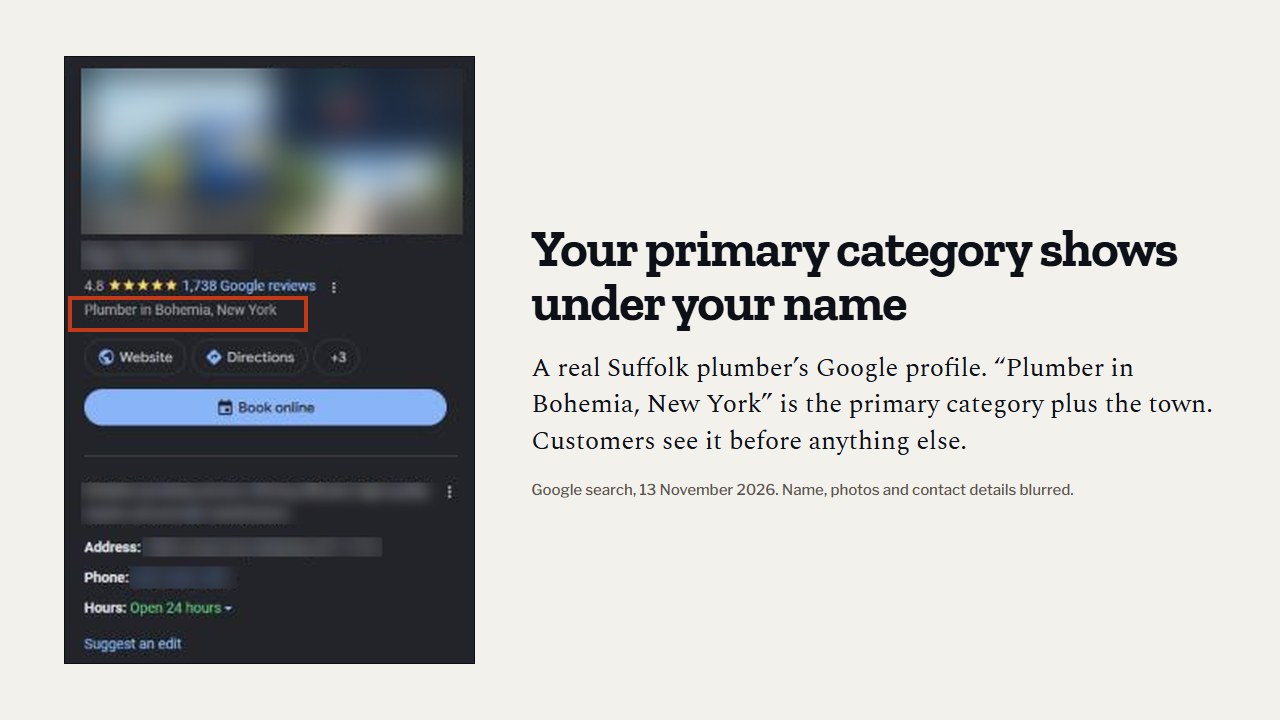
A lot of contractor profiles were set up years ago, in five minutes, by whoever was in the office that day. Somebody typed “contract” into the category box, picked the first thing that came up, and nobody has looked at it since.
That one choice tells Google what you are. If it says “Contractor” and a homeowner searches “roofer near me”, Google has to guess whether you fix roofs. It usually guesses someone else.
Short answer
Your primary category should be the one service you most want calls for, named the way customers search: “Plumber”, “HVAC contractor”, “Roofing contractor”, “Electrician”. Then add the extra categories that also describe what your business is, like “Drainage service” for a plumber who really does drain work. Skip anything you don’t do. Google’s rule is to use as few categories as possible to describe your core business.
Primary vs additional: what’s the difference?
Every Google Business Profile has one primary category. Google’s help page says it should be the one that best describes your business. You can then add additional categories for other things your business also is.
The primary one carries the most weight. In Whitespark’s 2026 Local Search Ranking Factors survey, 47 local search experts scored 187 factors for the map results.
Where the primary category and additional categories ranked out of 187 map ranking factors in Whitespark’s 2026 expert survey (published November 2025). “Incorrect primary category” ranked second on its list of things that hurt you.
A few more rules from Google’s own pages:
- You can only pick from Google’s list. You can’t make up your own category.
- If your exact category isn’t there, pick a more general one that fits.
- Some categories unlock extra features on your profile.
- Changing a category may make Google ask you to verify the business again. More on that in what to do when your profile is suspended or stuck in verification.
The “this business IS a” test
Google’s guidelines give a simple test. A category should finish the sentence “this business is a…”, not “this business has a…”.
Google’s own example: a motel with a pool is a “Motel”, not a “Swimming pool”. For a contractor it works the same way:
- A plumbing company that clears drains every week is a drainage service. Good extra category.
- A plumber who once installed a ceiling fan is not an electrician. Leave it off.
- An HVAC company that sells a few humidifiers is not an appliance store.
Whitespark’s survey lists categories from unrelated trades as a negative factor. Adding “Roofing contractor” to a plumbing profile to catch a few extra searches is more likely to confuse Google than help you.
Real category names by trade
These names come from a public list of Google’s US categories, checked on 12 November 2026. Google adds and renames categories, so type them into your own profile to confirm before you rely on them. Only add the extra ones you truly do.
| Trade | Usual primary | Extra categories that may fit |
|---|---|---|
| Plumbing | Plumber | Drainage service, Septic system service, Gas installation service, Bathroom remodeler |
| HVAC | HVAC contractor | Air conditioning contractor, Air conditioning repair service, Heating contractor, Furnace repair service, Air duct cleaning service |
| Roofing | Roofing contractor | Gutter service, Siding contractor, Skylight contractor, Insulation contractor |
| Electrical | Electrician | Electrical installation service, Lighting contractor, Electric vehicle charging station contractor |
Notice what isn’t there: “Contractor” and “General contractor”. They exist, but they are broad. Unless you really are a general contractor, they say less about you than your trade name does.
How to pick your primary category
Ask one question: which job do I most want the phone to ring for? For most plumbers that is “Plumber”. BrightLocal’s category guide gives a good example: for an HVAC company that makes most of its money on heating, “Heating contractor” might beat “HVAC contractor” as the primary, with the other as an extra. There’s no single right answer, only the right one for your business.
Then check the competition. Search your main service in your best city and note the top three businesses in the map. The public can see their primary category on the profile, but not their extra ones. Free browser extensions such as PlePer show the full list.
If two or more of the top three use a category you skipped, and it truly describes your business, that is a strong hint. Our free audit does this comparison for you and flags any category your competitors share that you don’t have.
Don’t forget the services under each category
Each category comes with a list of services you can tick, and you can add your own. Sterling Sky, a local SEO firm, retested this and found that adding Google’s listed services could lift rankings for those searches, though it varied by trade and market.
So tick every service you really do, such as water heater installation, leak detection or AC repair. Write each description for the customer, in plain words.
How to change your categories
- Open your Business Profile (search your business name on Google while signed in, or use the Google Maps app).
- Choose Edit profile.
- Next to Business category, choose edit.
- Type and select your primary category.
- Choose Add another category for each extra one.
- Choose Save.
Make all your category changes in one sitting. Since a category change can trigger a new verification, chopping and changing every week is asking for trouble. If you also want to clean up where you show on the map, read service area vs address: what sets your pin on Google Maps.
Do this this week
- Open your profile and write down your current primary and extra categories.
- Decide which job you most want calls for. Make that the primary.
- Check the top three map competitors for your main search.
- Add every extra category that passes the “this business IS a” test.
- Remove any category for work you don’t do.
- Tick every service you really do under each category.
Questions owners ask
How many categories should a contractor have?
As many as truly describe your business, and no more. Google says to use as few as possible to describe your core business. For most single-trade contractors that means the primary plus a handful of closely related ones.
Can I change my primary category with the seasons?
You can, but be careful. Google says changing a category may lead to a new verification, and a profile stuck in verification can’t help you in your busy season. Pick the primary that fits your business all year if you can.
What if my exact trade isn’t in the list?
Google says to pick a more general category that still fits. Then use the services list and your description to say exactly what you do.
Will changing my category hurt my ranking?
It can move it either way, which is the point. A better match usually helps for the searches it matches. Make your changes in one careful pass, note the date, and watch your calls for a few weeks.
Where to start
Check your primary category today. It takes two minutes and it is the biggest single setting on your profile. For the full order we work in, from categories to reviews, read our guide on how to rank higher in Google Maps.
If you want someone to check it with you, our free audit compares your categories with your top map competitors and shows the gaps. What we offer after that is on our packages page.
Sources
- Google Business Profile Help, “Manage your business category,” read 12 November 2026. support.google.com/business/answer/7249669
- Google Business Profile Help, “Guidelines for representing your business on Google,” read 12 November 2026. support.google.com/business/answer/3038177
- Whitespark, “Local Search Ranking Factors,” 2026 edition, published 6 November 2025 (47 experts, 187 factors). whitespark.ca/local-search-ranking-factors
- Sterling Sky, Joy Hawkins, on services in Google Business Profile and ranking, read 12 November 2026. sterlingsky.ca/services-in-google-business-profile-impact-ranking
- BrightLocal, guide to choosing the best Google Business Profile category, last updated October 2025 (on secondary categories not being shown to the public, and the heating contractor example). brightlocal.com/learn/how-to-choose-the-best-google-my-business-category-for-any-local-business
- Category names checked against Dalton Luka, public list of Google Business Profile categories (2026), read 12 November 2026. daltonluka.com/blog/google-my-business-categories