
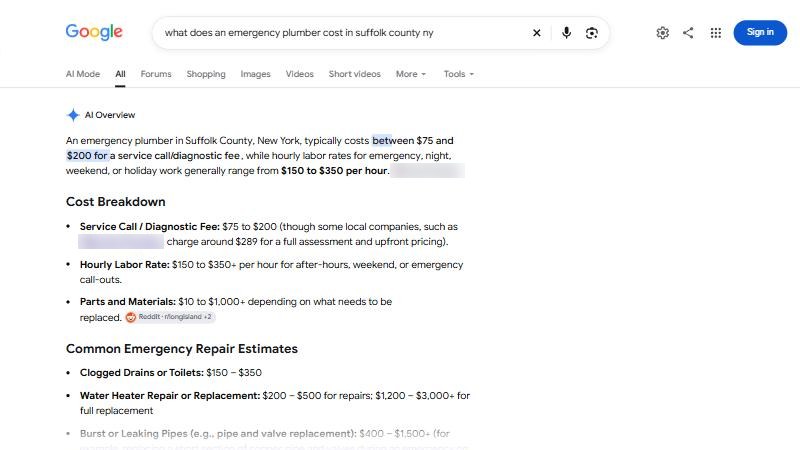
A homeowner in Chandler googles “why is my AC blowing warm air.” Before any links, Google writes her a short answer: check the filter, check the breaker, and if that doesn’t fix it, call a pro. Then it names two or three local HVAC companies.
She never scrolls to the map. She calls one of the names in the summary.
That summary is an AI Overview. Google also has AI Mode, a separate tab where people can chat with Google like they would with ChatGPT. Both now name local businesses. Here is how they choose.
Short answer
Google says there is no special sign-up or code needed to appear in AI Overviews or AI Mode. Its AI reads the same things normal Google search does. For local businesses, a large 2026 study by BrightLocal found Google’s AI leans heavily on the Google Business Profile, plus business websites. So a complete, accurate Google profile and a clear website are still the work.
What AI Overviews and AI Mode actually are
AI Overviews are the written summaries that sometimes appear at the top of normal Google results. Google says they only show when its systems decide they add something to the regular results. So not every search gets one.
AI Mode is a chat-style search. People ask longer questions and follow up. Google says both features can run several related searches behind the scenes, across subtopics and sources, to build one answer. Google calls this “query fan-out.”
For you, that means one customer question can pull in your Google profile, your reviews, your website and other sites that mention you, all at once.
What Google says you need: nothing new
Google’s own page for site owners on AI features is short and blunt. In plain words:
- No extra requirements. To show up as a link in AI Overviews or AI Mode, a page has to be indexed and eligible to show in Google with a text snippet. That is the same as normal search.
- No special files or markup. Google says you don’t need to create new AI text files or add special schema to appear in these features.
- Structured data still has to be honest. If your site has business markup, it should match what the page actually says.
- You can see the traffic. Clicks from AI features are counted in Search Console’s Performance report, under the “Web” search type.
Keep that in mind the next time someone tries to sell you an “AI optimization file” for Google. Google itself says it doesn’t need one.
What a 200,000-search study found
Google doesn’t publish how its AI picks local businesses. So the best evidence we have comes from testing. BrightLocal ran about 200,000 local searches through ChatGPT, Google AI Mode and Google AI Overviews, and published the results in September 2026.
Google’s AI leans on your Google profile
Google Business Profiles made up about 29% of all the sources cited across the three AI tools. The study says both of Google’s AI tools rely heavily on Google profiles, and also use Facebook. ChatGPT, by contrast, hardly used them.
Business websites are the long tail
93% of the different websites cited were the businesses’ own sites, and those made up 42% of all citations. Your website is not a brochure any more. It is a source.
Short lists, and they change
Average number of businesses named in a Google AI Overview for a local search. AI Mode named 3.5 on average (BrightLocal local AI visibility study, September 2026).
About 11% of answers on both Google AI tools named no business at all. And the AI picks were far less steady than the map. Tracked businesses showed up in the Google Maps results 66% of the time, but in AI Overviews only 38% of the time and in AI Mode 32%.
Service-area businesses start a step behind
This one matters for contractors. Businesses that hide their address and serve customers at home (most plumbers, roofers and HVAC shops) were named a little less often than storefronts: 36.9% vs 38.4% in AI Overviews, and 27.4% vs 31.9% in AI Mode. Not a reason to panic. A reason to make sure your profile’s service area and your website’s city list are complete.
Distance still counts
Google’s AI tools kept their picks fairly close to the searcher. In the study, 90% of their picks fell within roughly 39 to 64 km (about 24 to 40 miles), much tighter than ChatGPT.
Why your Google profile is still the center of it
Google’s help page on local ranking names three things: relevance (how well your profile matches the search), distance (how far you are from the searcher) and prominence (how well known you are, including reviews and ratings). It also says businesses with complete, accurate info are more likely to show up, and that there is no way to pay for a better local ranking.
Google doesn’t say its AI uses the exact same rules. But since its AI tools pull so heavily from Business Profiles, the same basics carry over. If your profile is half empty, the AI has less to work with.
Not sure how your profile stacks up? Our free audit checks your Google profile against the top three businesses in your map search, and shows what Google’s AI says for your trade and city.
What to fix, in order
- Pick the right primary category. It tells Google what you are, which is the heart of relevance. See how to pick your Google Business Profile categories.
- Fill in everything. Services, service area, hours (including holidays), description, photos of real jobs.
- Get steady, real reviews and reply to them. Google names reviews as part of prominence.
- Give each main service its own page on your website, and list the cities you serve in plain text.
- Make sure Google can index your site. Google says a page must be indexed and eligible for a snippet. A site that blocks Google, or a page tagged “nosnippet,” can’t be quoted.
- Keep details matching across your profile, website and Facebook page, since Google’s AI uses Facebook too.
How to see if Google’s AI names you
Open a private browser window and search the way a customer would: “AC not cooling Chandler,” “emergency plumber Plano.” See whether an AI Overview appears and who it names. Then try the same question in AI Mode. Do it on a few different days, because the answers move. Our step-by-step guide on how to check if AI tools recommend you covers the full method.
Don’t stop at Google. BrightLocal found AI Mode and AI Overviews shared only about 29% of the businesses they named, and ChatGPT overlapped with each of them only about 20%. Being in one is no promise of being in the others. That is why Bing Places and Apple Maps matter too. For how ChatGPT does it differently, read how ChatGPT picks local businesses.
Do this this week
- Search three customer questions in a private window. Note any AI Overview and who it names.
- Open your Google Business Profile and fill every empty field.
- Check your primary category against the top businesses in your map search.
- Make sure your website has one page per main service and lists your cities.
- Open Search Console (if you have it) and check that your key pages are indexed.
Common questions
Can I turn off AI Overviews for my business?
Not for your Google profile. For your website, Google lets you limit snippets with settings like “nosnippet,” but that also limits how you show in normal search. For most contractors, being quoted is the point.
Do I need an llms.txt file or special schema for Google’s AI?
Google says no. It states you don’t need new AI text files or special markup to appear in AI Overviews or AI Mode. Normal, honest business markup is still fine.
Will AI Overviews take my calls away?
Not necessarily. The AI Overview often names local businesses directly. The risk is being left out of a short list of two or three names, not the summary itself.
How is AI Mode different from AI Overviews?
AI Overviews are summaries at the top of normal results, shown only on some searches. AI Mode is a separate chat-style search. In BrightLocal’s study, AI Mode named a few more businesses per answer, 3.5 vs 2.5 on average.
Where to start
Open your Google profile today and fill in one thing that’s missing. It is the single source Google’s AI leans on most. If you want the full picture, our free audit shows your profile, your map position and what the AI tools say about you. What we do after that is on the packages page.
Sources
- Google Search Central, “AI features and your website,” read 12 November 2026. developers.google.com/search/docs/appearance/ai-features
- Google Business Profile Help, local ranking tips (relevance, distance, prominence), read 12 November 2026. support.google.com/business/answer/7091
- BrightLocal, local AI visibility study (about 200,000 non-branded searches in ChatGPT, Google AI Mode and AI Overviews, about 1.9 million citations), 16 September 2026. brightlocal.com/research/local-ai-visibility-study