
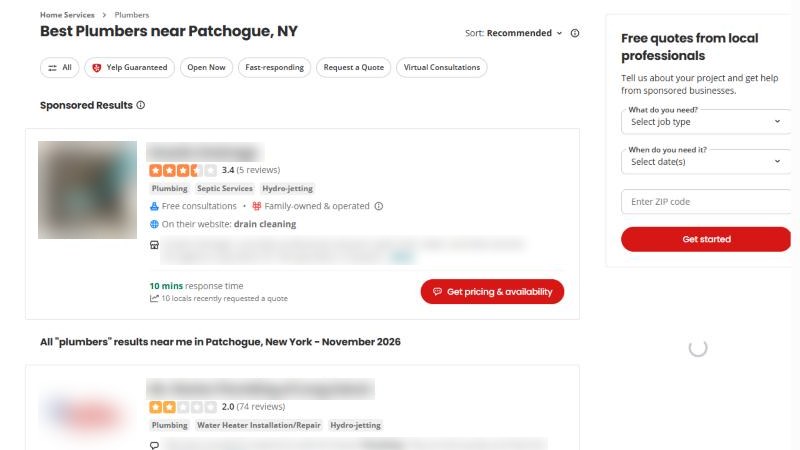
Most contractors have a Yelp story. The sales rep who called every Tuesday. The one weird review from 2019 that never went away. The page Yelp made for you without asking, with a phone number you stopped using two trucks ago.
So you ignored it. Reasonable. But this year the ground moved. Yelp’s reviews and business details now show up inside ChatGPT, and the customers asking ChatGPT for a plumber are reading them.
You don’t need to love Yelp. You need a page that is claimed, correct and complete. Then you mostly leave it alone.
Short answer
Yes, contractors should claim their Yelp page. It’s free, and since July 2026 Yelp licenses its reviews, ratings, photos and business details to OpenAI for ChatGPT answers. Claim it, fix your details, add real photos, then leave it alone: don’t buy ads you don’t want, and never ask customers for Yelp reviews, because Yelp’s rules forbid it and its software can hide prompted reviews.
Why Yelp matters again: the ChatGPT deal
On 23 July 2026, Axios reported that Yelp is licensing its reviews, photos and other business information to OpenAI. ChatGPT will show Yelp reviews, ratings, photos and business details in its answers, with Yelp’s name and a link.
Two more details from that report are worth knowing:
- Request a Quote is coming. Yelp said its “Request a Quote” feature would be added to ChatGPT soon, so a customer could ask a local pro for a quote without leaving the chat. In July that was announced, not live. Check your Yelp for Business account for quote requests either way.
- It isn’t only ChatGPT. Axios notes Yelp already supplies data to Apple Maps and Yahoo, and the OpenAI deal doesn’t stop Yelp from signing with other AI companies.
The data side backs this up. BrightLocal ran about 200,000 local searches through ChatGPT and Google’s AI tools in 2026. It found ChatGPT relies on Yelp and Bing, and Yelp made up nearly 1 in 10 of all the sources cited.
of the businesses in BrightLocal’s study had a Yelp page among the sources the AI tools cited for them (BrightLocal local AI visibility study, September 2026).
Put simply: if a customer asks ChatGPT about you, there’s a good chance it reads your Yelp page first. Better that page says the right things.
Step 1: Claim it (free, about 10 minutes)
Yelp says claiming is free, and a claimed page does not mean you advertise with Yelp. Here is how, using Yelp’s own steps:
- Go to biz.yelp.com/claim and search your business name.
- If your page is there, select it. If not, choose Add to Yelp for free.
- Create a Yelp for Business account with an email you actually check.
- Verify with the code Yelp sends by email, text, or a call to the phone number on your page.
If the phone on your page is an old number, fix that first or choose email, or the code goes to a phone you don’t have.
You will probably hear from Yelp’s sales team after you claim. That’s fine. “No thanks, just the free page” is a complete answer.
Step 2: Fill it in like a customer is reading it
Once claimed, Yelp gives you free tools to update your details, add photos, reply to reviews and messages, and see how many people viewed your page. Use them once, properly:
- Name, phone, website. Exactly as they appear on your Google profile. AI tools compare sources, and mismatches cause wrong answers.
- Hours. Yelp’s own guide warns that without hours, customers may assume you’re closed. If you do emergency calls, say so.
- Categories and service area. Pick the categories for the work you actually want, and list the cities you serve.
- Photos. Yelp suggests photos of finished projects and your team at work, with captions. A clean panel swap beats a stock photo of a smiling guy with a wrench.
- “From the business.” A few plain sentences: what you do, where, how long, license number. Facts AI tools can quote.
Not sure what Yelp, Google and the rest say about you right now? Our free audit checks whether your name, phone and address match across Google, Yelp, Facebook, Bing and Apple Maps.
Step 3: Leave it alone (mostly)
This is the part that saves you time and trouble.
Never ask for Yelp reviews
This is the rule that catches contractors out. Yelp’s content guidelines say “Businesses should never ask customers to write reviews.” Its support page on the topic goes further:
- Don’t ask anyone for a review: customers, mailing lists, friends or family.
- Your staff should never compete to collect reviews.
- Don’t ask for reviews after a survey or feedback form.
- Never offer freebies, discounts or payment for reviews.
Why it matters: Yelp says its software tries to spot reviews that look requested and may not recommend them, which can hurt your rating. For paying for reviews, Yelp runs a Consumer Alerts program that can put a pop-up warning on a business’s page.
So when you ask happy customers for a review, send them to Google. That is allowed, and it is where most of your future customers look. We cover how in how to ask for Google reviews without being pushy. Yelp reviews will come on their own from people who already use Yelp.
Don’t buy ads you didn’t plan for
Yelp is free to claim and keep. Ads are a separate decision, and nothing in this post requires them.
But log in now and then
“Leave it alone” doesn’t mean forget the password. Yelp’s business guide says a claimed page may switch back to unclaimed if the owner hasn’t logged in for 90 days. Put a reminder in your phone every two months. Log in, check your details, and reply calmly to any new reviews.
How to tell if it’s working
A couple of weeks after you claim and fill in your page, ask ChatGPT the questions your customers ask, with your trade and city. See whether you are named, and whether a Yelp link shows in the sources. Our step-by-step guide shows how to check if ChatGPT recommends you without fooling yourself.
Yelp is one of three places ChatGPT leans on. The other two are Bing and your own website. See why Bing Places and Apple Maps matter in 2026, and for the full picture, how ChatGPT picks local businesses to recommend.
Do this this week
- Claim your page at biz.yelp.com/claim.
- Match your name, phone, website and hours to your Google profile.
- Add 5 to 10 real photos of finished jobs, with captions.
- Write three plain sentences in “From the business,” with your license number.
- Set a phone reminder to log in every two months. Never ask for Yelp reviews.
Common questions
Can I put a “Find us on Yelp” sign in my van?
Telling people you’re on Yelp is different from asking for a review. Yelp’s rule is about asking or rewarding people for reviews. Keep any sign or link to “find us,” never “review us.”
Can I get a bad Yelp review removed?
Yelp’s rules say you can’t offer a customer anything to remove a review. As a claimed business you can reply to it, and a short, calm public reply is usually the better move anyway.
Does a claimed Yelp page help me on Google?
Google doesn’t publish that. What we know is that AI tools compare sources, so a Yelp page that matches your Google profile helps tell one consistent story about you.
Do I have to advertise on Yelp to show up in ChatGPT?
No. The Yelp–OpenAI deal, as reported, is about Yelp’s reviews, ratings, photos and business details. Claiming your page and filling it in is free.
Where to start
Claim your page tonight. Ten minutes, no cost, and it fixes the oldest wrong phone number on the internet. If you want a full check of your listings first, start with our free audit, and see what we offer on the packages page.
Sources
- Axios, “Exclusive: Yelp partners with ChatGPT to surface reviews,” 23 July 2026. axios.com
- BrightLocal, local AI visibility study (about 200,000 non-branded searches in ChatGPT, Google AI Mode and AI Overviews, about 1.9 million citations), 16 September 2026. brightlocal.com/research/local-ai-visibility-study
- Yelp Support Center, “Don’t Ask for Reviews,” read 12 November 2026. yelp-support.com/article/Don-t-Ask-for-Reviews
- Yelp, Content Guidelines, read 12 November 2026. yelp.com/guidelines
- Yelp Support Center, “What is a claimed business?,” read 12 November 2026. yelp-support.com/article/What-is-a-claimed-business
- Yelp for Business, “The simple steps to claiming your Yelp Page,” read 12 November 2026. business.yelp.com/resources