
Tuesday morning, the phone is quiet. Too quiet. You search your own business name and the profile with your 80 reviews is gone. In your inbox there’s an email from Google with the word “suspended” in it.
The first instinct is to make a fresh profile and start again. Don’t. That is the one move Google tells you not to make, and it can make a fixable problem harder to fix.
Short answer
Don’t create a new profile. Open Google’s Business Profile appeals tool, read the reason it gives, fix that problem, and send one appeal with documents whose name and address match your profile, such as a business license or utility bill. Google says decisions can take up to 5 business days. If you’re stuck in verification instead, Google picks the method; for a video, record one live, unbroken clip of at least 30 seconds showing where you are, your tools or branded van, and proof you run the business.
First, work out which problem you have
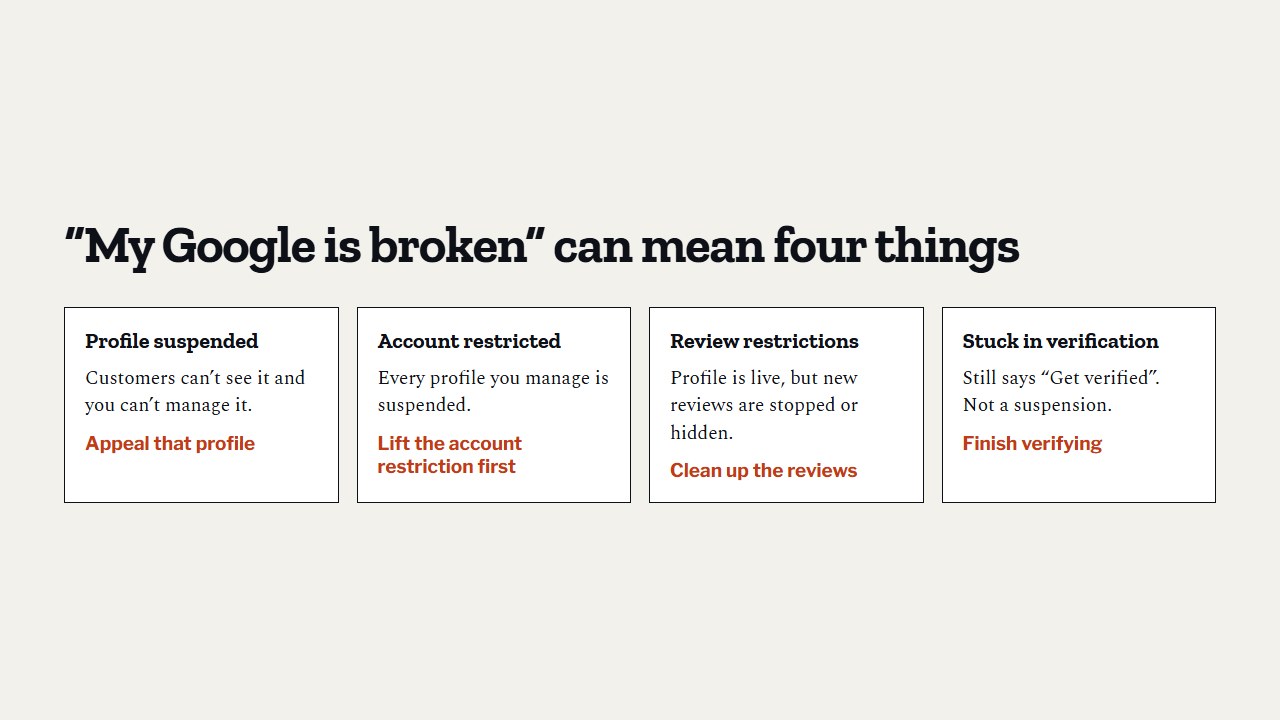
“My Google is broken” can mean four different things, and each has its own fix:
- Profile suspended or disabled. The public can’t see it, and you can’t manage it. You appeal that profile.
- Google account restricted. Every profile you manage is suspended, and you can’t create or claim new ones. You lift the account restriction first, on your Google “My accounts” page, then appeal each profile.
- Review restrictions. Your profile is live, but Google has stopped new reviews, hidden existing ones, or added a public warning that fake reviews were removed. Google says this happens when it finds fake or incentivized reviews.
- Stuck in verification. The profile exists but still says “Get verified” or shows “Review issues”. That’s not a suspension. Skip to the verification section below.
Why contractor profiles get suspended
Google says it may suspend profiles that don’t follow its guidelines. It doesn’t publish a full list of reasons, but Whitespark’s 2026 Local Search Ranking Factors survey asked 47 experts to rate the biggest suspension risks. Their top ones:
- An address that is a P.O. box, mail store, virtual office or other false address
- A link to a Google account that has itself been suspended
- Reports of violations on your profile
- A link to other suspended profiles
- A hacked website or malware
- Reports of review gating (only asking happy customers)
- Reports of fake reviews
- Keyword stuffing in the business name
For a contractor, numbers 1 and 8 are the easiest to trip over by accident. A rented mailbox in a bigger city, or a name like “Joe’s Plumbing Best Drain Cleaning Anaheim”, puts a target on the profile. Google’s guidelines say the name should be your real-world name, and that a virtual office isn’t eligible for a profile.
Edits can also trip things. Google says changing your category may make you verify the business again. If your profile got flagged right after a round of changes, that’s a clue.
How to appeal a suspended profile
Our advice before anything else: fix the cause first. The appeals tool shows the date of the decision, the reason, and a link to the policy Google says you broke. If it’s your name, change it to your real name. If it’s your address, remove a fake one and set a service area instead of an address.
Then Google’s help page lays out the appeal like this:
- Open the Business Profile appeals tool and sign in with the Google account linked to the profile.
- Pick the profile and the decision you want to contest.
- Upload evidence and explain in a few plain sentences why the profile follows the rules.
- Tick the box and submit.
How long Google says appeal reviews and decisions can take. It warns not to send several appeals for the same issue while you wait (Google Business Profile Help, read November 2026).
What evidence to send
Google lists the kinds of documents that help:
- Your official business registration
- Your business license (for contractors, your state license is the obvious one)
- A tax certificate
- A utility bill: power, phone, water or internet
The key detail: the business name and address on each document should match your profile. If your license says “Smith Plumbing Inc.” and your profile says “Smith Plumbing & Rooter Experts”, fix the profile, not the paperwork.
What not to do while you wait
- Don’t create a new profile for the same business. Google says so plainly.
- Don’t send a second appeal for the same issue before you get a decision.
- Don’t start editing everything else. Change only what caused the problem.
If the appeal is turned down
The appeals tool shows a status: submitted, approved, not approved, can’t be appealed, or eligible for appeal. Google says that if your request is denied, it may do an additional review, and you can add evidence you didn’t send the first time. “Can’t be appealed” is the one status with no next step in the tool.
Real cases can take longer. During a wave of suspensions in 2022, BrightLocal reported Google product experts describing waits of three to four weeks.
If you want a second look at your profile, our free audit checks your categories, reviews and last post date against your top competitors.
Review restrictions are a different problem
If Google decides a business broke its fake engagement policy, it can stop new reviews for a set time, hide existing ones, and show a warning that fake reviews were removed. Google says it emails the owner before it applies a restriction, and you can appeal.
The fix is simple and slow: stop whatever caused it. That means no paid reviews, no discounts for reviews, and no asking only the happy customers. The federal rules on this are in what the FTC fake review rule means for you.
Stuck in verification
Verification is Google checking that you are a real business and that you’re allowed to manage this profile. You don’t get to pick how. Google’s help page says the methods are chosen automatically and can’t be changed. You might be offered a phone call or text, an email, a live video call, a postcard, or a video recording.
If you’re waiting on a postcard
- Google says most codes arrive within 14 days.
- Don’t edit your name, address or category while you wait, or the code won’t work.
- Don’t request a new code. That cancels the first one.
- Codes expire after 30 days.
How to pass video verification as a contractor
Google’s rules for the recording:
- Record it live on your phone, through your Business Profile. No pre-recorded or edited video.
- One continuous clip, at least 30 seconds, with no breaks.
- No bank, tax or ID numbers on screen, and no other people’s faces.
For a service-area business, Google asks you to show three things:
- Where you are. Street signs or landmarks near your business address. Not an empty lot.
- That the business exists. Your tools, equipment or branded work shirts.
- That you run it. Do part of a job, or unlock your branded van. You can also show a permit, invoice or utility bill with the same name as your profile.
A simple plan: street sign on your corner, walk to your truck, unlock it, show the tools and the logo, then hold up your license. Practice once before you hit record.
To start: open your profile on your phone, tap Get verified, choose Business video, read the requirements, and tap Start recording. Google says the review can take up to 5 business days.
If it fails, your profile shows Review issues. Tap it, read what was missing, and record a new video that has everything from the first one plus the missing part.
Do this this week
- Check your profile is live: search your business name on Google and Maps.
- Make sure your business name on Google matches your license, word for word.
- Remove any mailbox or virtual office address.
- Put a PDF of your license and a recent utility bill in one folder, ready for an appeal.
- If you’re stuck in verification, plan and practice your 30-second video.
- Never start a second profile for the same business.
Questions owners ask
How long does a Google Business Profile appeal take?
Google says appeal reviews and decisions can take up to 5 business days. Some cases take longer, so send one complete appeal and wait for the decision.
Will I lose my reviews if my profile is suspended?
A suspended profile is hidden from the public, reviews included. Creating a new profile starts you from zero and breaks Google’s rules, so appealing the original is the way to try to get them back.
Can I choose phone verification instead of video?
No. Google says the verification methods are chosen automatically and can’t be changed. If video is the only option offered, follow Google’s video checklist carefully.
Where to start
If you’re suspended, open the appeals tool today and read the reason before you change anything. If you’re fine right now, do the checklist above so you’re ready if it ever happens. Then get back to the work that grows the profile, starting with picking the right Google categories and the rest of our guide to ranking higher in Google Maps.
If you want a second pair of eyes on your profile, our free audit is a good place to start. What we offer after that is on our packages page.
Sources
- Google Business Profile Help, “Fix suspended or disabled profiles,” read 12 November 2026. support.google.com/business/answer/4569145
- Google Business Profile Help, “Appeal Business Profile content & profile restrictions,” read 12 November 2026. support.google.com/business/answer/13597551
- Google Business Profile Help, “Business Profile restrictions for policy violations,” read 12 November 2026. support.google.com/business/answer/14114287
- Google Business Profile Help, “Verify your business on Google,” read 12 November 2026. support.google.com/business/answer/7107242
- Google Business Profile Help, “Verify your business with a video recording,” read 12 November 2026. support.google.com/business/answer/14271705
- Google Business Profile Help, “Guidelines for representing your business on Google,” read 12 November 2026. support.google.com/business/answer/3038177
- Google Business Profile Help, “Manage your business category,” read 12 November 2026. support.google.com/business/answer/7249669
- Whitespark, “Local Search Ranking Factors,” 2026 edition, published 6 November 2025 (47 experts, 187 factors). whitespark.ca/local-search-ranking-factors
- BrightLocal, “Google Business Profile Suspensions Bug Fix Confirmed, but Reinstatement Chaos Continues,” 25 October 2022. brightlocal.com/blog/google-business-profile-suspension-reinstatement-bug-chaos